
If you’re a new blogger using Pinterest to bring visitors to your website, you have probably wondered whether you can pin the same blog post more than once.
Maybe you’ve written a helpful article, designed a beautiful Pin, and published it on Pinterest.
A few days later, you create another design for that same article. Should you publish it, or could doing so hurt your account?
It’s a reasonable question, especially when you’re still learning how Pinterest works.
Yes, you can create multiple distinct Pins that link to the same blog post. The important thing is to create useful, original variations rather than repeatedly publishing identical Pins or making tiny changes just to repost the same content.
When I promote a blog post, I prefer to experiment with different images, formats, headlines, and design styles.
I also recommend leaving at least 10 days between promotions of the same article as a practical scheduling preference.
That is my recommendation, not an official Pinterest rule or a guarantee against spam restrictions.
Let’s look at how to approach this in a way that makes sense for a new blogger.
THE SHORT ANSWER
Can You Pin the Same Blog Post More Than Once?
Yes! You can create multiple Pinterest Pins that link to the same blog post. Try different images, headlines, layouts, and design styles while keeping each Pin relevant to the article. The goal is to create useful variations, not repeatedly publish identical designs.
Is It Okay to Pin the Same Blog Post More Than Once?
Yes, you can promote the same article through multiple Pins, provided each Pin offers a meaningful, relevant presentation of the content.
Think about how people use Pinterest. One person might be drawn to a bold headline, while another might notice an attractive image.
Someone else might click because the Pin promises to solve a specific problem.
Your blog post may be useful to all three people, but one design won’t necessarily communicate its value equally well to everyone.
For example, imagine you have published an article about organizing a small bedroom.
You could create one Pin highlighting storage ideas, another focusing on space-saving furniture, and a third featuring a simple room makeover.
All three Pins could link to the same article, but each would emphasize a different benefit.
The key is that the variations must accurately represent the content on the destination page. If a Pin promises 15 storage solutions, the linked article should actually deliver those solutions.
Pinterest’s official business guidance recommends creating original content regularly and warns against repeatedly saving the same Pins or uploading content that already exists on Pinterest.
Repetitive behavior may result in spam flags or temporary restrictions on creating Pins. You can review the guidance in Pinterest’s Pin performance and distribution help article.
So, rather than asking only whether the URL is the same, consider whether the new Pin provides a genuinely different and useful presentation of the article.
What Counts as a Fresh Pinterest Pin?
Your Fresh Pin Checklist
Before publishing another Pin for the same article, check these four things.
Use a different image or visual composition.
Try a new, relevant headline or reader benefit.
Experiment with typography, layout, or Pin format.
Make sure the Pin accurately represents the linked article.
A fresh Pin is more than an existing design with one minor detail changed. It should offer a meaningfully different creative presentation while accurately representing the same destination.
Here are some ways to develop useful variations.
1. Use a different image
If your article includes several relevant photographs or illustrations, try using different visuals across your Pins.
For a blog post about small bathroom ideas, one Pin might feature a bright, minimalist bathroom, while another highlights a compact vanity or clever shelving.
The visuals should be relevant to the article, not simply different for the sake of being different.
2. Try a different headline
Your headline can highlight a particular benefit or address a specific reader concern.
For example, an article about Pinterest keyword research might have one Pin titled “How to Find Pinterest Keywords for Your Blog” and another titled “Find Better Pinterest Keywords Before Writing Your Next Post.”
Both communicate the same broad topic, but they approach it from slightly different angles.
Make sure the alternative headline remains accurate and doesn’t promise something the article fails to explain.
3. Experiment with the layout
You can change the arrangement of images and text, the typography, the visual hierarchy, or the overall composition.
One design might use a large headline over a single image. Another could feature a collage, a numbered list, or a more minimal layout.
The goal is to create a genuinely different creative option, not to produce dozens of nearly identical designs.
4. Highlight a different benefit
An article often answers more than one question. Use that to develop distinct Pins.
For example, a guide to creating Pinterest Pins in Canva could support a Pin about designing faster, another about choosing readable fonts, and a third about building reusable templates.
Each Pin should lead to the relevant information in the article.
5. Use different formats when they suit the content
Pinterest supports multiple content formats, including image and video Pins. Choose a format that makes sense for the article and helps communicate its value.
You don’t need to use every available format. A well-designed static image may be entirely suitable for a straightforward tutorial.
My rule of thumb: before publishing another Pin for the same article, ask yourself whether it communicates a useful idea differently enough to deserve its own place on Pinterest.
How Long Should You Wait Before Pinning the Same Blog Post Again?
MY PERSONAL PINNING TIP
I recommend leaving at least 10 days between promotions of the same blog post as a starting point for your scheduling workflow.
This is where many new bloggers look for a specific number of days.
In my own recommended workflow, I prefer to leave at least 10 days between promotions of the same blog post.
This gives me a simple scheduling guideline and helps me avoid repeatedly publishing variations too close together.
However, it is important to understand what this recommendation does—and does not—mean.
Pinterest does not publish a universal rule stating that every blogger must wait 10 days before publishing another distinct Pin for the same URL.
Nor does waiting 10 days automatically make duplicate or repetitive content acceptable.
Pinterest’s published guidance focuses on avoiding duplicate Pins, maintaining relevant links, and creating original content regularly.
I would use the 10-day interval as a practical starting point for organizing your content, not as a way to calculate a guaranteed safe posting frequency.
A simple example of a 10-day schedule
Suppose you publish a blog post on the first day of the month and prepare three distinct Pin designs for it.
| Day | What to do |
|---|---|
| Day 1 | Publish the first Pin with your strongest design. |
| Day 11 | Publish a second Pin with a meaningfully different image and headline. |
| Day 21 | Publish a third variation with a different creative angle. |
This is an example of how my preferred spacing could work in a content calendar. It is not an official Pinterest schedule, and you don’t need to follow these exact dates.
If you have other useful articles to promote, you can publish Pins for those articles between these dates.
That way, your content calendar doesn’t revolve around repeatedly promoting one URL.
Above all, prioritize relevance and meaningful creative differences over the calendar itself.
How Many Pinterest Pins Should You Create for One Blog Post?
There isn’t one number that works for every article or every account.
Some articles lend themselves to several useful creative angles. Others have a narrower purpose and may only need a small number of distinct Pins.
If you’re a beginner, I would start by creating two or three genuinely different designs for an important blog post. This is a manageable starting point, not a Pinterest requirement.
Before creating additional variations, consider these questions:
- Does the article answer several related questions?
- Can you highlight different benefits without misrepresenting the content?
- Do you have enough relevant images to support different designs?
- Are your existing Pins attracting meaningful clicks or other engagement?
- Can you create another useful variation without repeating the same design?
If the answer to those questions suggests that more variations would be useful, create them gradually and evaluate their performance.
You don’t need to design 20 Pins for every article just because someone online recommends that number. More Pins do not automatically mean more traffic.
A smaller set of relevant, well-designed Pins is a sensible place to start while you learn what your audience responds to.
How to Create Multiple Pinterest Pins for the Same Blog Post
If you want to promote one article more than once, a simple workflow can help you avoid repetitive designs.
Step 1: Choose the blog post you want to promote
Start with an article that is useful to your audience and ready to receive visitors.
Check that the content is accurate, the page loads properly, and the article delivers the information your Pin will promise.
There’s little benefit in creating several attractive Pins for an article that needs substantial improvement.
Step 2: Identify different angles
Read through the article and identify the main problems it solves.
Ask yourself what would make someone want to click.
For example, a Pinterest SEO article might cover keyword research, board organization, Pin titles, and descriptions. Each of those subjects could inspire a different Pin, as long as the article provides enough information to support the headline.
Write down two or three potential angles before opening Canva.
Step 3: Create distinct designs
Now develop the creative variations.
You might change the primary image, layout, headline, or visual treatment. Keep the design readable, and make the topic clear at a glance.
You can use Canva templates to speed up this process, but avoid letting every design look almost identical. A reusable template is a starting point, not a reason to publish repetitive content.
Step 4: Write an accurate Pin title and description
Use language that explains the Pin’s topic and naturally incorporates relevant keywords.
Avoid stuffing the description with repeated search phrases. The text should help Pinterest users understand what they will find after clicking.
Make sure the Pin’s title, description, imagery, and destination page all tell a consistent story.
Step 5: Link to the correct article
Before publishing, check the destination URL. It should take users directly to the article discussed in the Pin.
Pinterest advises creators to avoid broken links and ensure that the Pin’s imagery, text, and keywords match the linked landing page.
This is a small step, but it matters. A beautiful Pin cannot provide a good experience if it sends people to the wrong page.
Step 6: Schedule thoughtfully
Add your Pins to your content calendar, allowing time between promotions according to your workflow.
I recommend starting with the 10-day interval described earlier if you want a simple guideline. Keep publishing other relevant content in the meantime, and don’t treat the interval as a guarantee of compliance.
Step 7: Review the results
Once your Pins have had time to collect data, look beyond impressions alone.
Check whether people are saving the Pins, clicking through to your website, and engaging with the article. Use the available data to decide which creative approaches are worth exploring further.
Don’t assume that a single Pin’s early performance tells you everything about its potential.
Example: One Blog Post, Five Different Pinterest Pins
Let’s use a hypothetical blog post titled “How to Find Pinterest Keywords for Your Blog.”
The article explains how bloggers can research keywords and use them to plan relevant content. Here are five possible Pin concepts that could point to that same URL.
| Pin concept | Example headline | Creative direction |
|---|---|---|
| Beginner tutorial | How to Find Pinterest Keywords for Your Blog | A clear, step-by-step tutorial layout. |
| Common problem | Not Sure Which Pinterest Keywords to Use? | A bold question-led headline with a simple background. |
| Practical workflow | A Simple Pinterest Keyword Research Process | A checklist-style design. |
| Content planning | Find Pinterest Keywords Before Writing Your Next Post | A notebook or content-planning visual. |
| Mistakes to avoid | Pinterest Keyword Research Mistakes to Avoid | A contrasting, problem-focused layout. |
PUT IT INTO PRACTICE
Your Simple Multiple-Pin Workflow
Choose one blog post
Select an existing article that is useful to your audience and worth promoting again.
Create three distinct Pins
Try different visuals, headlines, and layouts while linking each Pin to the same article.
Schedule and review
Space out your promotions, then compare impressions, saves, and outbound clicks to see which designs connect with readers.
These are creative concepts, not five Pins that you must publish.
Each variation should link to the same article only if the article genuinely covers the promised information.
For example, don’t publish the “mistakes to avoid” version unless the article actually discusses relevant mistakes.
You can also test different designs without changing the article’s overall topic.
The idea is to make the article useful to readers approaching the subject from different perspectives.
Mistakes to Avoid When Pinning the Same Blog Post
Creating multiple Pins can be part of a sensible content strategy, but a few habits can make your approach less effective.
Publishing identical Pins repeatedly
Uploading the same image and creative again and again is not a good strategy. Pinterest specifically warns against repeatedly saving duplicate Pins.
Create original variations instead of relying on repeated uploads of the same design.
Changing only a tiny detail
Changing one word, moving a text box slightly, or switching a small decorative element may not create a meaningful new creative.
Focus on a different presentation, a useful new angle, or a distinct visual treatment.
Publishing too many variations in a short burst
Creating a batch of Pins is useful for your workflow, but you don’t need to publish every variation immediately.
Plan your content thoughtfully and avoid repetitive activity that adds little value. Pinterest also warns that repeatedly performing actions too quickly can lead to temporary rate-limit blocks.
Using a misleading headline
A Pin should accurately represent the article it links to. Don’t promise a complete strategy, a guaranteed result, or a list of ideas if the destination doesn’t deliver it.
The reader’s experience matters more than a headline that earns a momentary click.
Saving Pins to unrelated boards
Choose boards that genuinely match the subject of the Pin. Saving an article about Pinterest SEO to an unrelated board simply to distribute it more widely doesn’t improve the relevance of the content.
Deleting old Pins unnecessarily
You don’t need to delete every older Pin just because you’ve created a new design.
Review older Pins individually and consider their relevance, quality, and performance before deciding what to do.
Pinterest notes that deleted Pins cannot be recovered, so avoid deleting content without a clear reason.
How to Tell Whether Your New Pinterest Pins Are Working
The purpose of creating different Pins is not simply to increase the number of graphics on your account. You want to understand which presentations help people discover and visit your content.
Pinterest Analytics can help you assess individual Pin performance, while website analytics can help you understand what happens after visitors arrive.
Here are some useful metrics to consider.
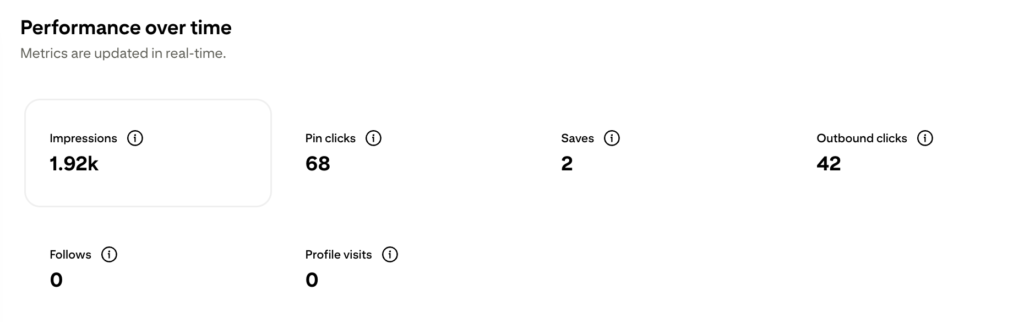
Impressions: How often your Pin was shown. This helps you understand visibility, but it doesn’t tell you how many people visited your website.
Saves: How often people saved your Pin. Saves can indicate that someone found the idea worth keeping, although they don’t necessarily translate into website visits.
Outbound clicks: How often people clicked through from Pinterest to the destination website. This is particularly relevant when your goal is to attract blog readers.
Website sessions from Pinterest: Use your website analytics to understand how much traffic is actually arriving from Pinterest. This gives you a more direct view of visits than impressions alone.
For example, imagine one design receives more impressions while another receives fewer impressions but more outbound clicks.
The second design may be doing a better job of encouraging website visits, even though its reach is lower.
Don’t judge every Pin by the same metric. If your goal is blog traffic, pay particular attention to outbound clicks and the website sessions that follow.
Over time, these observations can help you decide which topics, headlines, and design styles deserve more attention.
Promote Your Blog Posts With a Purpose
If you’re new to Pinterest, don’t feel that you need to create a completely new blog post every time you want to publish a Pin.
One helpful article can inspire several distinct Pins. Experiment with different images, layouts, headlines, and reader benefits, while making sure every design accurately represents the content people will find after clicking.
In my workflow, I recommend leaving at least 10 days between promotions of the same article.
Treat that as a practical scheduling preference rather than a platform rule, and focus on publishing useful, original Pins instead of repeating the same creative.
Most importantly, measure what happens after people see your Pins. If your goal is to grow your blog, website visits matter more than impressions alone.
If you want a more structured approach to planning your Pins, improving your Pinterest strategy, and working toward consistent blog traffic, explore my Pinterest Growth Guide. It can be your next step toward building a more organized Pinterest workflow.
SAVE THIS TAKEAWAY
The 4 Rules to Remember
One blog post can have multiple Pins pointing to it.
Make each Pin meaningfully different and relevant.
Avoid repetitive, spam-like publishing.
Use performance data to guide future Pin designs.
FAQs
Can I use the same URL for multiple Pinterest Pins?
Yes. You can create multiple distinct Pins that lead to the same blog post. Make sure each Pin is relevant, provides a useful creative variation, and accurately represents the destination.
Can I change only the text on a Pinterest Pin?
You can edit some Pin details after publishing, but Pinterest does not let you change the image or video content of an existing published Pin. If you want to test a substantially different visual design, create a new Pin.
Can I create a new Pin for an old blog post?
Yes. An older article can still be useful to your audience. Review the article first, update outdated information where necessary, and create a fresh, relevant Pin that accurately reflects the page.
Should I delete old Pins before creating new ones?
Not automatically. Review older Pins individually and keep the ones that remain useful and relevant. If you decide to delete a Pin, remember that Pinterest says deleted Pins cannot be recovered.